How I Deploy My Next.js Project to AWS Amplify (with ISR)
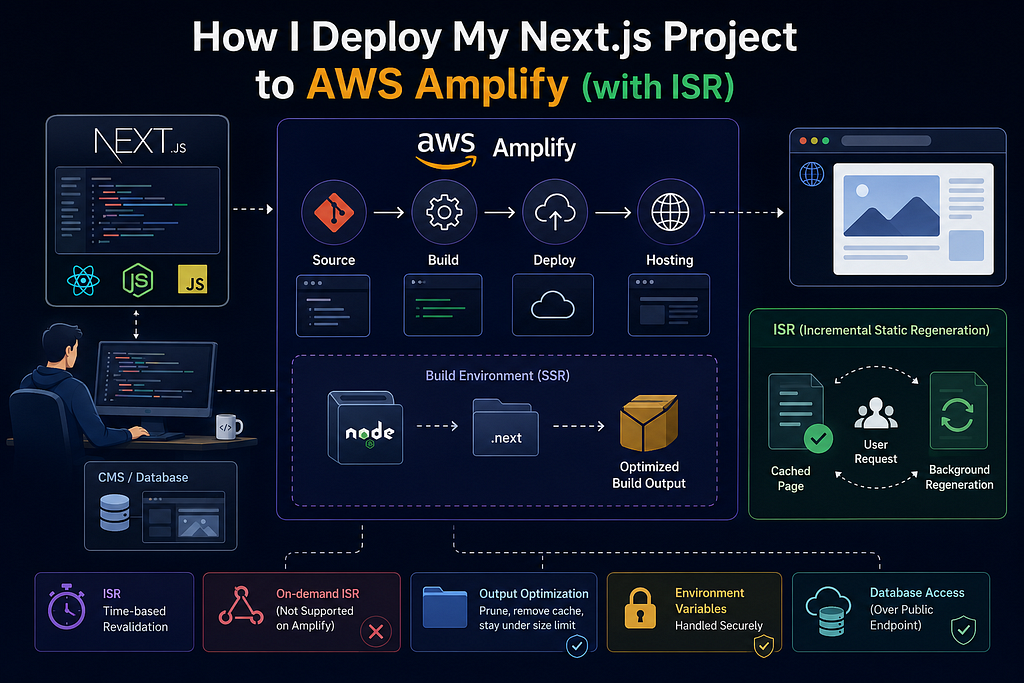
I recently moved a Next.js app onto AWS Amplify Hosting, and a few things tripped me up along the way - the build spec, the size limit, and how ISR actually behaves once it’s on Amplify. This is basically the note I wish I’d had before I started.
First, the platform: it’s SSR, not static export
If you’re coming from the old “export to S3 and serve static files” flow, forget that here. My app uses a CMS integration that needs a running Node server (Payload CMS talking to a database), and a static export can’t give you that. So it deploys on Amplify’s Web Compute (SSR) platform instead.
The good news is Amplify detects Next.js automatically. When it sees a Next.js SSR app with no amplify.yml in the repo, it generates a build spec for you and sets baseDirectory to .next. In my case, I don't commit an amplify.yml at all, I paste the build spec directly into the Amplify Console's build settings. Both approaches work; just know that if an amplify.yml is present in your repo, it overrides whatever you've set in the console, so don't split your config across both.
One thing worth saying up front: make sure you’re on the compute platform, not static. If your next.config.js has output: 'export', Amplify treats the whole thing as a static site, and your SSR and ISR pages silently stop working.
Does ISR work on Amplify? Mostly yes, with one catch
This was the part I most wanted to confirm before committing, so I dug into it.
ISR (Incremental Static Regeneration) is a Next.js feature that serves a fast, pre-built cached version of a page while quietly rebuilding a fresh copy in the background - so you get speed without the page staying stale forever.
It comes in two flavors.
Time-based ISR refreshes on a timer: you write something like export const revalidate = 60 on a page, meaning "let this page go stale after 60 seconds," and after that window, the next visitor still gets the fast cached page instantly while Next.js rebuilds a new one behind the scenes. This works perfectly on Amplify.
On-demand ISR refreshes the instant something changes instead of waiting for a timer - for example, an editor updates an article in your CMS, the CMS pings your app, and that one page updates immediately. This does not work on Amplify (though it does on Vercel).
So the takeaway is: on Amplify, treat ISR as a scheduled thing - pick a sensible revalidate interval (minutes to hours, depending on how fresh the page needs to be), and don't design your app around instant, on-demand updates.
The build spec I actually use
Here’s the shape of my Console build settings:
version: 1
frontend:
  phases:
    preBuild:
      commands:
        - npm ci --legacy-peer-deps
    build:
      commands:
        - npm run build
        - npm prune --omit=dev --legacy-peer-deps
        - rm -rf node_modules/next/next-swc-fallback
        - rm -rf .next/cache
  artifacts:
    baseDirectory: .next
    files:
      - "**/*"
  cache:
    paths:
      - .next/cache/**/*
      - node_modules/**/*
The baseDirectory: .next with files: "**/*" matches AWS's own documented example for Next.js SSR, so that part I leave alone.
Why those three extra build commands matter
The reason my build spec has those three lines after npm run build is simple: my build output was exceeding Amplify's size limit, and I had to trim it. Amplify caps the build output for SSR apps at 220 MB. Go over that, and the deploy fails with a "build output exceeds the maximum allowed size" error.
When I measured a production build locally, the culprits were obvious:
- node_modules in full was around 960 MB
- .next in full (including cache) was around 1.5 GB
- of that .next, the cache alone (.next/cache) was roughly 1.3 GB - the vast majority
- Meanwhile, the standalone build (what actually needs to run) was only about 133 MB
So here’s what each of those three lines does:
- npm prune --omit=dev --legacy-peer-deps
- rm -rf node_modules/next/next-swc-fallback
- rm -rf .next/cache
npm prune --omit=dev --legacy-peer-deps strips devDependencies out of the top-level node_modules. My next.config.js already sets output: 'standalone', which makes Next.js trace only the dependencies actually needed at runtime - that's why the standalone folder is so much smaller than the full node_modules. The prune cleans up anything downstream that still looks at the top-level folder.
rm -rf node_modules/next/next-swc-fallback is honestly a leftover from an older Next.js version's SWC fallback layout. On my current Next.js version that directory doesn't even exist, so this line is a no-operation - it reclaims nothing today. But rm -rf on a missing path is silent and harmless, so I keep it in for now. If you want a cleaner spec, you can drop it; I'm just being transparent that it's not doing heavy lifting.
rm -rf .next/cache is the big win. That cache is build-tooling scratch space (webpack/SWC/image cache) - it speeds up the next build but is not needed to run the app. Deleting it after the build shaves off the largest single chunk. And because the build spec keeps .next/cache/**/* in the cache.paths block, Amplify re-seeds it for the following build, so I'm not paying a full cold rebuild every time.
That combination - standalone tracing, pruning dev deps, and dropping the cache - is what got me comfortably back under the 220 MB ceiling.
One thing I don’t currently do: DB inside a VPC
Worth flagging for completeness, since it may apply to you differently. My setup does not currently place the database inside a VPC. The Amplify compute functions reach the database over its public endpoint, not through VPC networking. If your compliance or security posture requires the DB to live inside a private VPC, and the SSR compute to reach it privately - that’s an extra piece of networking you’d need to design for, and it’s not part of what I have running today. I’m calling it out so nobody assumes VPC isolation is in place when it isn’t. (Also, VPC resources aren’t directly reachable for now on Amplify)
Environment variables:
This one confused me at first because it looked like Amplify “wasn’t taking” my environment variables.
Amplify Console environment variables are available at build time, but a Next.js server component does not automatically get them at request time.
My repo route: next.config.js reads process.env.X directly, which is available during the Amplify build, and re-exposes the values through the env: {} key. Because that runs at build time, the values get baked into the build output, which sidesteps the runtime-injection gap. It works.
A real warning about secrets in next.config.js
I want to be careful here, because it’s tempting to tell yourself, “putting it in next.config.js won't expose it to the frontend, so don't worry." That is not true as a blanket rule, and it matters because my env list includes things like DATABASE_URL, PAYLOAD_SECRET, and S3_SECRET_ACCESS_KEY.
The only reason those secrets aren’t in the browser bundle is that no client-side code in my repo currently references process.env.DATABASE_URL. The day someone imports a shared module that references one of those into a 'use client' file or anything that ends up in a page's client bundle.
env: {
PAYLOAD_SECRET: process.env.PAYLOAD_SECRET,
DATABASE_URL: process.env.DATABASE_URL,
S3_BUCKET: process.env.S3_BUCKET,
S3_REGION: process.env.S3_REGION,
S3_ACCESS_KEY_ID: process.env.S3_ACCESS_KEY_ID,
S3_SECRET_ACCESS_KEY: process.env.S3_SECRET_ACCESS_KEY,
NEXT_PUBLIC_SERVER_URL: process.env.NEXT_PUBLIC_SERVER_URL,
NEXT_PUBLIC_NOINDEX: process.env.NEXT_PUBLIC_NOINDEX
}
Happy Coding :)